Install on Windows
By the end of this page Virtue FX Manager will be installed as a REAPER extension and reachable from the REAPER Action List.
Virtue FX Manager for Windows ships as an installer built with Inno Setup. It installs a single REAPER extension file and needs no administrator rights for the standard per-user install path.
Who signed the installer
Section titled “Who signed the installer”From version 1.2.3, the installer, the uninstaller it writes and the extension
reaper_virtue.dll are code-signed and timestamped. The Windows security prompt
therefore names a publisher:
Rodney Florencio da Costa
That is the name on the certificate — Rodney signs the Windows builds himself, under his own name rather than a company name. The certificate was issued by Certum Code Signing 2021 CA and runs until 19 December 2027. If the prompt shows any other publisher name, you are not running our file.
Installers for 1.2.2 and earlier were never signed, so on those Windows has no publisher to name and says the publisher is unknown. That is expected for an older download.
Get past the SmartScreen warning
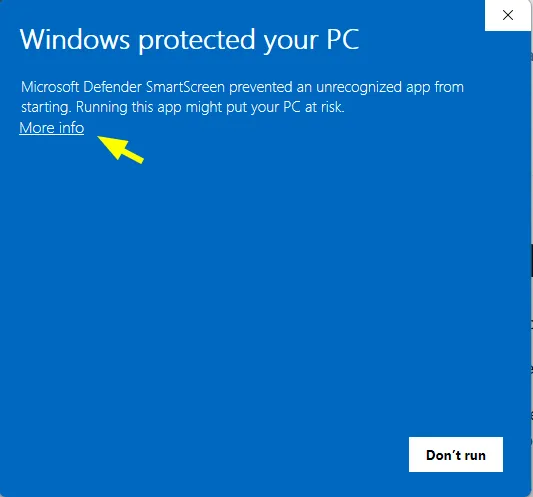
Section titled “Get past the SmartScreen warning”SmartScreen shows a blue screen when it has not yet seen an installer run often enough. This is a reputation prompt, not a malware detection. The first blue screen shows no publisher line; that appears after the next click.
-
Click More info under the warning text.
-
The dialog now shows App and Publisher. Check that the publisher reads Rodney Florencio da Costa.
-
Click Run anyway at the bottom-right of the dialog.
Install
Section titled “Install”-
Confirm the REAPER path.
The installer auto-detects your REAPER resource directory at
%APPDATA%\REAPER. If you run a portable REAPER installation, browse to that folder instead — the extension must live inside the REAPER installation you actually launch.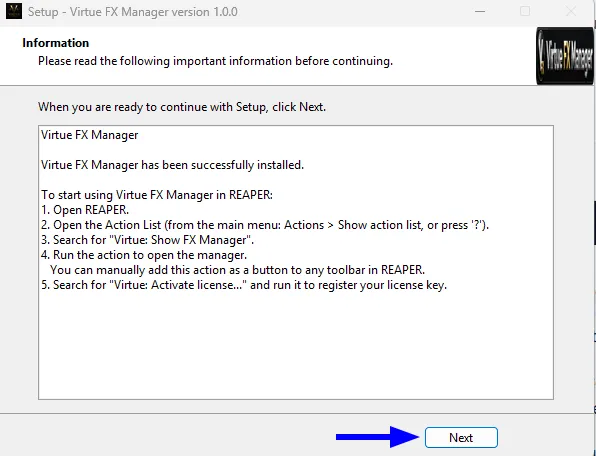
-
Install.
Click Next, then Install. The extension
reaper_virtue.dllis copied into yourUserPluginsfolder.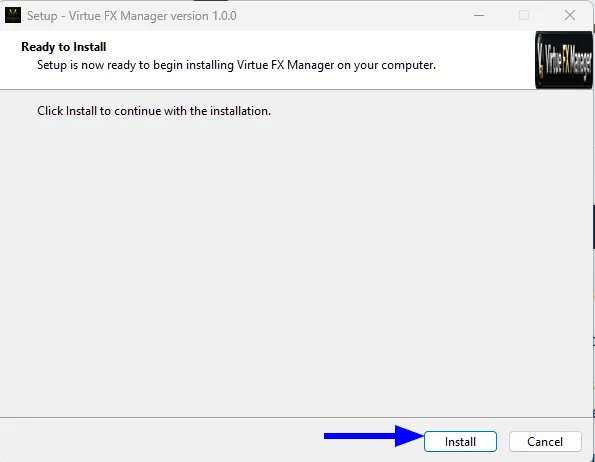
-
Launch it in REAPER.
Open REAPER, press ? to open the Action List, search for Virtue FX Manager, and run the action. The window opens over REAPER.
What the installer writes
Section titled “What the installer writes”| Path | Contents |
|---|---|
%APPDATA%\REAPER\UserPlugins\reaper_virtue.dll |
The REAPER extension itself |
%APPDATA%\REAPER\Virtue\ |
Your data: settings, favourites, thumbnails, notes, themes |
The installer does not modify REAPER’s own program files. Updating or
reinstalling preserves everything in the Virtue\ folder.
Next steps
Section titled “Next steps”- Activate your licence — start a trial or enter a purchased key.
- Quick start — first scan and first plugin insert.
- REAPER does not list the Virtue action — if the extension does not appear.