/* global React, BrushIcon, RadialMenuSVG */
const { useState: useState2, useEffect: useEffect2, useRef: useRef2 } = React;

const REVEAL_FEATURES = {
  search: {
    label: 'Filter Engine',
    callout: {
      title: 'Advanced Filter Engine',
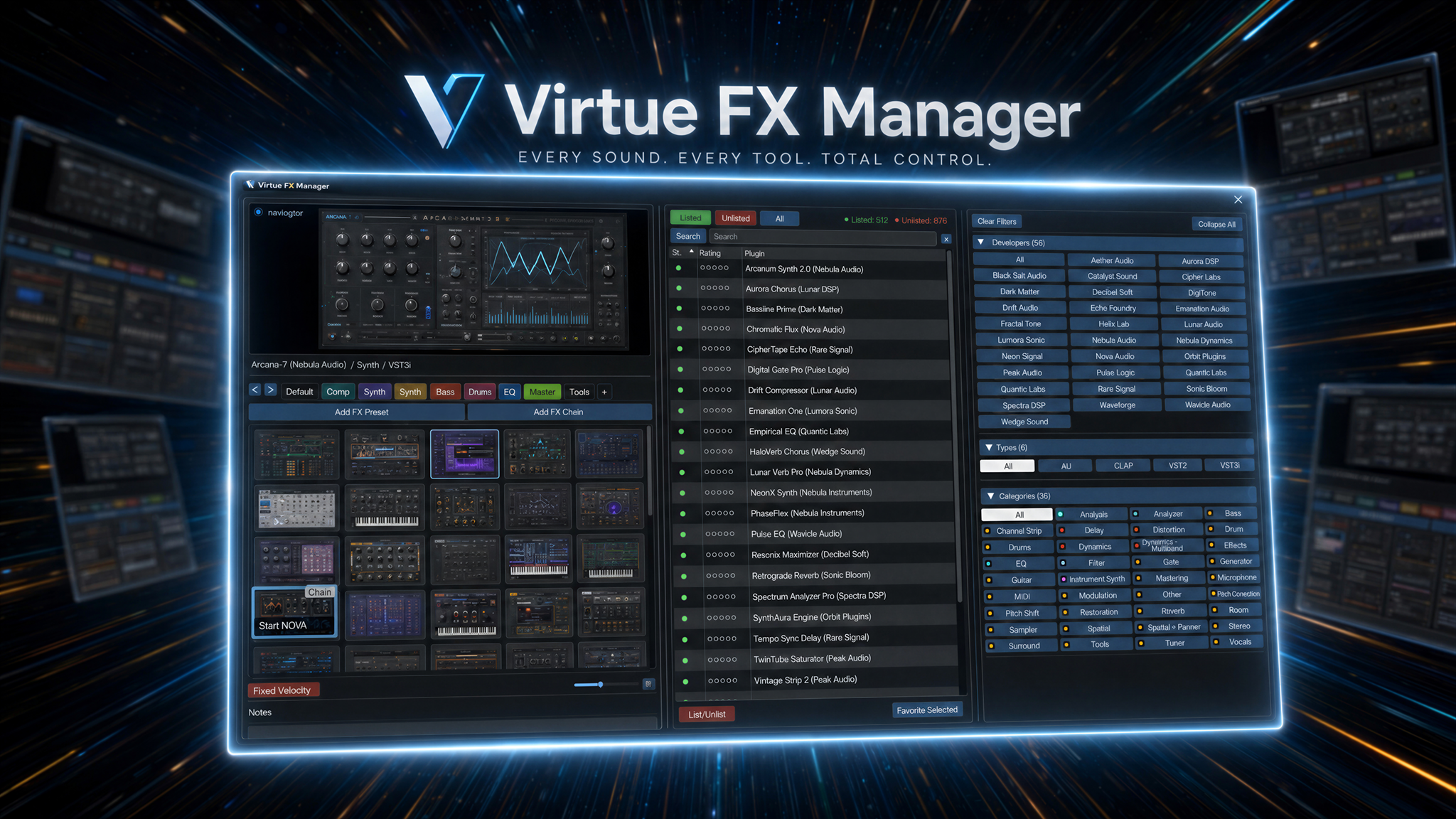
      body: 'Filter thousands of plugins in milliseconds. Focus by developer brand, format (VST3, AU, CLAP, JSFX), or category chips in one tap.',
      hint: 'Click another hotspot to explore'
    }
  },
  favorites: {
    label: 'Custom Boards',
    callout: {
      title: 'Personalized Layout Boards',
      body: 'Organize your custom chains and favorites into draggable tabs. Pin REAPER FX chains for instant recall.',
      hint: 'Click another hotspot to explore'
    }
  },
  firewall: {
    label: 'Clutter Firewall',
    callout: {
      title: 'Visibility Control Firewall',
      body: 'Keep your search workspace clean. Toggle status circles to list or unlist trial versions, utility wrappers, or clutter plugins.',
      hint: 'Click another hotspot to explore'
    }
  },
  scanner: {
    label: 'Auto Scanner',
    callout: {
      title: 'Background Thumbnail Scanner',
      body: 'Scans your plugin directory automatically. opens plugins to snap graphical thumbnails, handles and blocklists crashing plugins safely.',
      hint: 'Click another hotspot to explore'
    }
  }
};

const Reveal = ({ scrollY, sectionTop, vh }) => {
  const sectionHeight = vh * 2.0;
  const leadIn = vh * 0.35;
  const revealOver = vh * 0.85;
  const localScroll = scrollY - sectionTop + leadIn;
  const p = Math.max(0, Math.min(1, localScroll / revealOver));

  // Interactions
  const [hoveredId, setHoveredId] = useState2(null);
  const [mouse, setMouse] = useState2({ x: 0, y: 0 });

  useEffect2(() => {
    const handleMouseMove = (e) => {
      const x = (e.clientX / window.innerWidth) * 2 - 1;
      const y = (e.clientY / window.innerHeight) * 2 - 1;
      setMouse({ x, y });
    };
    window.addEventListener('mousemove', handleMouseMove);
    return () => window.removeEventListener('mousemove', handleMouseMove);
  }, []);

  const defaultHotspots = [
    { id: 'search', x: 74.0, y: 44.0, label: 'Filter Engine' },
    { id: 'favorites', x: 41.8, y: 71.0, label: 'Favorites Board' },
    { id: 'firewall', x: 50.0, y: 61.5, label: 'Clutter Firewall' },
    { id: 'scanner', x: 41.5, y: 43.5, label: 'Auto Scanner' }
  ];

  // Circle mask reveal calculations
  const reveal = Math.max(0, Math.min(1, p));
  const r = reveal * 130;
  const feather = 28;
  const innerR = Math.max(0, r - feather);
  const revealMask = `radial-gradient(circle at 50% 55%, black ${innerR}%, transparent ${r}%)`;
  const onOpacity = Math.min(1, reveal * 1.4);
  const interactive = reveal >= 0.5;

  const swayX = mouse.x * 12;
  const swayY = -mouse.y * 10;

  // Rotating features list showing VFxM advantages over default REAPER FX browser
  const rotatingFeatures = [
    {
      name: "Visual Recognition",
      desc: "Auto-scans graphical screenshots instead of scrolling plain text lists.",
      iconType: "scan",
      format: "VST3/AU",
      variant: 0
    },
    {
      name: "Custom Boards",
      desc: "Organize favorites into drag-and-drop workspaces (vocals, master, synths).",
      iconType: "star",
      format: "FAVORITES",
      variant: 1
    },
    {
      name: "Persistent Notes",
      desc: "Pin custom comments and session details inside plugin cards.",
      iconType: "note",
      format: "PRESETS",
      variant: 2
    },
    {
      name: "Drag-to-Track",
      desc: "Drag plugin cards straight to the timeline to auto-build track channels.",
      iconType: "drag",
      format: "DAW API",
      variant: 3
    },
    {
      name: "Clutter Firewall",
      desc: "Hide trial duplicates, utility wrappers, and junk plugins instantly.",
      iconType: "lock",
      format: "FIREWALL",
      variant: 4
    },
    {
      name: "Auto-Scan Safeguard",
      desc: "Scans background plugin directories safely and blocklists crashing items.",
      iconType: "firewall",
      format: "SYSTEM",
      variant: 5
    },
    {
      name: "Filter Engine",
      desc: "Instant search filter by developer, category, and format tags.",
      iconType: "search",
      format: "SPEED",
      variant: 6
    },
    {
      name: "FX Chains Load",
      desc: "Instantiate full sequential signal chains in one double-click.",
      iconType: "tag",
      format: "FX CHAINS",
      variant: 7
    },
    {
      name: "Quick Crop Camera",
      desc: "Capture custom plugin interface screenshots in one click.",
      iconType: "scan",
      format: "SCANNER",
      variant: 0
    },
    {
      name: "Multi-Select Builder",
      desc: "Select and load multiple plugins sequentially in a single action.",
      iconType: "drag",
      format: "PIPELINE",
      variant: 3
    },
    {
      name: "Rating & Usage Stats",
      desc: "Sort and filter by your most used or top-rated plugin processors.",
      iconType: "star",
      format: "ANALYTICS",
      variant: 1
    },
    {
      name: "DAW Crash Shield",
      desc: "Auto-isolates and blocklists unstable plugins during directory scans.",
      iconType: "lock",
      format: "SECURITY",
      variant: 4
    },
    {
      name: "Instant Hotkey HUD",
      desc: "Summon the browser overlay instantly at your mouse cursor.",
      iconType: "search",
      format: "WORKFLOW",
      variant: 6
    },
    {
      name: "Format Multi-Chips",
      desc: "Toggle VST3, AU, CLAP, and JSFX filters simultaneously.",
      iconType: "tag",
      format: "FILTER",
      variant: 7
    },
    {
      name: "Non-Destructive Hide",
      desc: "Keep DAW pathways intact while cleaning up your workspace list.",
      iconType: "firewall",
      format: "DISK SPACE",
      variant: 5
    },
    {
      name: "Visual Preset Loader",
      desc: "Load custom presets directly from the floating browser card.",
      iconType: "note",
      format: "PRESETS",
      variant: 2
    }
  ];

  const [activeLeft, setActiveLeft] = useState2(0); // [0, 3, 6, 9, 12, 15]
  const [activeRightHigh, setActiveRightHigh] = useState2(1); // [1, 4, 7, 10, 13]
  const [activeRightLow, setActiveRightLow] = useState2(2); // [2, 5, 8, 11, 14]

  const [fadeLeft, setFadeLeft] = useState2(true);
  const [fadeRightHigh, setFadeRightHigh] = useState2(true);
  const [fadeRightLow, setFadeRightLow] = useState2(true);

  useEffect2(() => {
    if (!interactive) return;
    let t = 0;
    const interval = setInterval(() => {
      t = (t + 1) % 3;
      if (t === 0) {
        setFadeLeft(false);
        setTimeout(() => {
          setActiveLeft((prev) => {
            const list = [0, 3, 6, 9, 12, 15];
            return list[(list.indexOf(prev) + 1) % list.length];
          });
          setFadeLeft(true);
        }, 300);
      } else if (t === 1) {
        setFadeRightHigh(false);
        setTimeout(() => {
          setActiveRightHigh((prev) => {
            const list = [1, 4, 7, 10, 13];
            return list[(list.indexOf(prev) + 1) % list.length];
          });
          setFadeRightHigh(true);
        }, 300);
      } else if (t === 2) {
        setFadeRightLow(false);
        setTimeout(() => {
          setActiveRightLow((prev) => {
            const list = [2, 5, 8, 11, 14];
            return list[(list.indexOf(prev) + 1) % list.length];
          });
          setFadeRightLow(true);
        }, 300);
      }
    }, 2200);

    return () => clearInterval(interval);
  }, [interactive]);

  return (
    <section className="reveal-wrap" data-screen-label="02 Reveal Comparison">
      <div className="reveal-sticky">
        <div className="reveal-header">
          <div className="reveal-tagline">The Workflow</div>
          <h2 className="reveal-h2">
            REAPER menus are a relic. <span className="blue-it">Say hello to VFxM.</span>
          </h2>
        </div>

        <div className="reveal-stage">
          <div className="reveal-image-container">
            {/* Off Layer: Mock classic Windows REAPER FX Window */}
            <div className="reveal-img reveal-off" style={{
              background: '#2d2d2d',
              height: '100%',
              display: 'flex',
              flexDirection: 'column',
              fontFamily: 'system-ui, sans-serif',
              fontSize: '12px',
              color: '#ccc',
              pointerEvents: 'none'
            }}>
              <div style={{ background: '#3d3d3d', padding: '8px 12px', borderBottom: '1px solid #4a4a4a', fontWeight: 'bold', color: '#fff' }}>
                Add FX to Track 1
              </div>
              <div style={{ display: 'flex', flex: 1 }}>
                <div style={{ width: '180px', borderRight: '1px solid #4a4a4a', padding: '10px', background: '#262626', color: '#888' }}>
                  All Plugins<br />
                  └ VST<br />
                  └ VST3<br />
                  └ AU<br />
                  └ JSFX<br />
                  └ Developer<br />
                  └ Categories
                </div>
                <div style={{ flex: 1, padding: '16px', display: 'flex', flexDirection: 'column', gap: '8px', overflow: 'hidden' }}>
                  <div style={{ background: '#333', padding: '6px', border: '1px solid #555' }}>Filter: </div>
                  <div style={{ display: 'flex', flexDirection: 'column', gap: '4px', opacity: 0.7 }}>
                    <div>VST: ReaComp (Cockos)</div>
                    <div>VST: ReaDelay (Cockos)</div>
                    <div>VST3: Parametric EQ</div>
                    <div>VST3: Room Reverb</div>
                    <div>AU: Sampler Engine</div>
                    <div>VST: Saturation Drive</div>
                    <div>JS: Utility/volume_pan</div>
                    <div>VST3: Sidechain Ducker</div>
                  </div>
                </div>
              </div>
            </div>

            {/* On Layer: VFxM visual interface */}
            <img
              className="reveal-img reveal-on"
              src="VFxM_Main.png"
              alt=""
              draggable={false}
              style={{
                WebkitMaskImage: revealMask,
                maskImage: revealMask,
                opacity: onOpacity
              }} />

            {/* Floating animated plugin cards combined with the main screenshot */}
            {interactive && (
              <>
                <PluginCard
                  variant={rotatingFeatures[activeLeft].variant}
                  name={rotatingFeatures[activeLeft].name}
                  format={rotatingFeatures[activeLeft].format}
                  iconType={rotatingFeatures[activeLeft].iconType}
                  desc={rotatingFeatures[activeLeft].desc}
                  className="reveal-card-left"
                  style={{
                    zIndex: 30,
                    transform: `translate3d(0, 0, 40px) rotateX(${swayY * 0.8}deg) rotateY(${swayX * 0.8}deg)`,
                    opacity: fadeLeft ? Math.min(1, (reveal - 0.5) * 2.5) : 0,
                    transition: 'border-color 0.25s, box-shadow 0.25s, transform 0.1s, opacity 0.3s'
                  }}
                />
                <PluginCard
                  variant={rotatingFeatures[activeRightHigh].variant}
                  name={rotatingFeatures[activeRightHigh].name}
                  format={rotatingFeatures[activeRightHigh].format}
                  iconType={rotatingFeatures[activeRightHigh].iconType}
                  desc={rotatingFeatures[activeRightHigh].desc}
                  className="reveal-card-right-high"
                  style={{
                    zIndex: 30,
                    transform: `translate3d(0, 0, 50px) rotateX(${swayY * 1.1}deg) rotateY(${swayX * 1.1}deg)`,
                    opacity: fadeRightHigh ? Math.min(1, (reveal - 0.5) * 2.5) : 0,
                    transition: 'border-color 0.25s, box-shadow 0.25s, transform 0.1s, opacity 0.3s'
                  }}
                />
                <PluginCard
                  variant={rotatingFeatures[activeRightLow].variant}
                  name={rotatingFeatures[activeRightLow].name}
                  format={rotatingFeatures[activeRightLow].format}
                  iconType={rotatingFeatures[activeRightLow].iconType}
                  desc={rotatingFeatures[activeRightLow].desc}
                  className="reveal-card-right-low"
                  style={{
                    zIndex: 30,
                    transform: `translate3d(0, 0, 30px) rotateX(${swayY * 0.9}deg) rotateY(${swayX * 0.9}deg)`,
                    opacity: fadeRightLow ? Math.min(1, (reveal - 0.5) * 2.5) : 0,
                    transition: 'border-color 0.25s, box-shadow 0.25s, transform 0.1s, opacity 0.3s'
                  }}
                />
              </>
            )}

            {/* Hotspots */}
            {interactive && (
              <div className="reveal-hotspots">
                {defaultHotspots.map((h) => (
                  <div
                    key={h.id}
                    className="reveal-hotspot"
                    style={{ left: `${h.x}%`, top: `${h.y}%` }}
                    onMouseEnter={() => setHoveredId(h.id)}
                    onMouseLeave={() => setHoveredId(null)}>
                    <div className="hotspot-ring" />
                    <div className="hotspot-label">
                      <strong className="hotspot-title">{REVEAL_FEATURES[h.id].callout.title}</strong>
                      <span className="hotspot-desc">{REVEAL_FEATURES[h.id].callout.body}</span>
                    </div>
                  </div>
                ))}
              </div>
            )}
          </div>

          <div className="reveal-copy">
            <p>Ditch cluttered lists and slow search bars. VFxM floats inside REAPER, showing beautiful thumbnails, favorites, and track shortcuts right at your cursor.</p>
          </div>
        </div>
      </div>
    </section>
  );
};

// YouTube demo transition video card
const Transition = () => {
  const wrapRef = useRef2(null);
  const [reveal, setReveal] = useState2(0);

  useEffect2(() => {
    const el = wrapRef.current;
    if (!el) return;
    let raf = 0;
    const tick = () => {
      raf = 0;
      const r = el.getBoundingClientRect();
      const vh = window.innerHeight || 800;
      const start = vh * 0.70;
      const end = 0;
      const p = 1 - Math.max(0, Math.min(1, (r.top - end) / (start - end)));
      setReveal(p);
    };
    const onScroll = () => { if (!raf) raf = requestAnimationFrame(tick); };
    tick();
    window.addEventListener('scroll', onScroll, { passive: true });
    window.addEventListener('resize', onScroll);
    return () => {
      if (raf) cancelAnimationFrame(raf);
      window.removeEventListener('scroll', onScroll);
      window.removeEventListener('resize', onScroll);
    };
  }, []);

  const outerR = reveal * 130;
  const feather = 28;
  const innerR = Math.max(0, outerR - feather);
  const styleVars = {
    '--rz-rev-inner': `${innerR}%`,
    '--rz-rev-outer': `${outerR}%`
  };

  return (
    <section className="transition-wrap" id="demo" ref={wrapRef} style={{
      position: 'relative',
      background: 'var(--bg)',
      padding: '40px 4% 10px 4%',
      textAlign: 'center'
    }}>
      <div style={{ maxWidth: '800px', margin: '0 auto' }}>
        <h2 style={{
          fontSize: 'clamp(28px, 4vw, 48px)',
          fontWeight: 800,
          letterSpacing: '-0.04em',
          marginBottom: '16px'
        }}>
          See <span style={{ color: 'var(--o)', fontStyle: 'italic', fontWeight: 600 }}>VFxM in action.</span>
        </h2>
        <p style={{ color: 'var(--t-2)', fontSize: '15px', marginBottom: '40px' }}>
          Watch this quick overview demonstrating visual plugin scanning and workflow boards in a real session.
        </p>

        {/* Embedded IFrame for VFxM Demo */}
        <div style={{
          position: 'relative',
          width: '100%',
          paddingBottom: '56.25%', // 16:9
          borderRadius: '16px',
          overflow: 'hidden',
          border: '1px solid var(--line-strong)',
          boxShadow: '0 20px 60px rgba(56,189,248,0.1)'
        }}>
          <iframe
            src="https://www.youtube.com/embed/hSe0Z_JrwpA?autoplay=0&rel=0"
            title="Virtue FX Manager Overview"
            allow="accelerometer; autoplay; clipboard-write; encrypted-media; gyroscope; picture-in-picture"
            allowFullScreen
            style={{
              position: 'absolute',
              top: 0, left: 0,
              width: '100%', height: '100%',
              border: 0
            }}>
          </iframe>
        </div>
      </div>
    </section>
  );
};

window.Reveal = Reveal;
window.Transition = Transition;
